ThumbsKill
A helpful addition to ThumbsPlus if it is used on Windows Vista
First start
At the first start of ThumbsKill the program will
search through the system for the ThumbsPlus executable. This may
take a few seconds while the harddisk is working.
Normally ThumbsKill will find ThumbsPlus. After found it, the program path will be stored. In the future there will be no need to search for ThumbsPlus anymore. That will increase the startup speed.
It's possible that ThumbsKill is unable to find your ThumbsPlus installation. In this case it will show the settings dialog and the path to the ThumbsPlus executable must be specified manually.
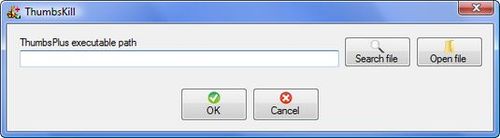
To do so, the file Thumbs.exe of the ThumbsPlus installation have to be selected by clicking the button Open file. Clicking the button Search file will lead to no result when the application wasn't able to find the executable on start.
Normally ThumbsKill will find ThumbsPlus. After found it, the program path will be stored. In the future there will be no need to search for ThumbsPlus anymore. That will increase the startup speed.
It's possible that ThumbsKill is unable to find your ThumbsPlus installation. In this case it will show the settings dialog and the path to the ThumbsPlus executable must be specified manually.
To do so, the file Thumbs.exe of the ThumbsPlus installation have to be selected by clicking the button Open file. Clicking the button Search file will lead to no result when the application wasn't able to find the executable on start.
About the program
- Overview
- Download
- Installation
- First start
- How it works
Switch language
- English
- German
Contact |
© 2009 Werner Kaurzinek | www.kaurzinek.net